


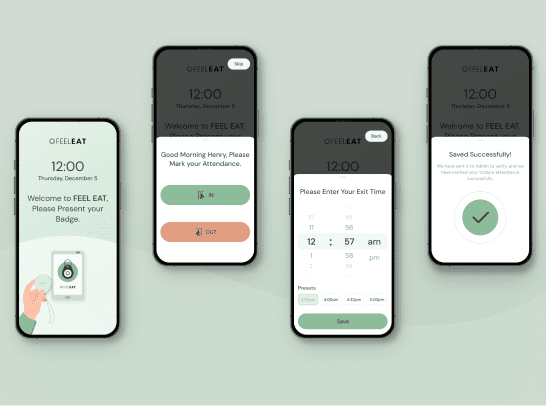
The FeelEat Employees App is a complete workforce management companion built to support staff in their day-to-day operations with clarity, accuracy, and ease. Designed for modern food-service teams, the app centralizes essential tasks—making attendance, task tracking, and performance monitoring more efficient than ever. Employees can easily clock in and out, review their attendance history, track working hours, and stay updated with their daily responsibilities—all from a simple, user-friendly interface. The app also provides real-time activity logs, shift summaries, and automated alerts to keep staff aligned and informed throughout the day. With secure authentication, digital signatures for verification, and role-based access, the system ensures high accountability while reducing the need for manual paperwork or administrative follow-ups. Visual performance analytics help employees understand their productivity trends, overtime, and progress, empowering them to stay motivated and improve over time.


Before the FeelEat Employees App was introduced, staff operations across multiple kitchen and service locations were heavily dependent on manual processes. Attendance tracking relied on physical registers, WhatsApp confirmations, or verbal updates—leading to frequent inaccuracies, time theft, and inconsistencies in shift records. Employees had no unified platform to review their working hours, tasks, or performance insights, creating confusion and affecting accountability. Managers struggled with the lack of real-time visibility into staff activity, making shift planning, performance tracking, and payroll verification time-consuming and error-prone. Important data such as overtime, leave requests, and daily productivity often needed manual compilation, resulting in administrative overload and frequent miscommunication.
 Inaccurate Attendance Tracking
Attendance across various kitchens and locations was recorded manually using paper logs, informal WhatsApp messages, or verbal confirmations. This led to frequent errors, inconsistent records, time theft, and mistrust between staff and management.
Lack of Real-Time Staff Visibility
Managers had no clear way to track who was on duty, when employees started or ended shifts, or which tasks were completed. This lack of real-time visibility caused planning issues, communication gaps, and operational delays across multiple locations.
Confusing Work Hour & Overtime Records
Work hours were scattered across registers, screenshots, and manual calculations. Overtime tracking was inconsistent, often leading to disputes between employees and payroll teams.
Administrative Overload for Managers
Managers spent significant time cross-checking attendance, validating shift hours, handling leave requests, and updating reports manually.
No Platform for Employees to Access Their Data
Employees had no dedicated system to view their attendance history, daily activity, or performance metrics. This led to constant inquiries, confusion regarding working hours, and limited accountability.
Digital Clock-In System
The app introduced secure digital clock-ins using Face ID, QR, or device authentication, ensuring every entry is accurate and verified. This eliminated manual errors, improved trust, and provided instant, reliable attendance logs.
Live Activity & Shift Monitoring
The central dashboard now updates staff activity in real time, allowing managers to monitor attendance, shift status, and workflow instantly—improving coordination and reducing downtime.
Automated Timesheets & Analytics
The app calculates total hours, overtime, breaks, and productivity automatically. This brought transparency, reduced conflicts, and made payroll processing faster and error-free.
Centralized Workflow Automation
Key tasks like attendance approvals, leave management, and performance tracking were digitized and automated, reducing manual work and freeing managers to focus on optimizing staff workflows.
Self-Service Employee Dashboard
The Employees App provides a personalized dashboard where staff can check their attendance logs, shift details, and performance insights anytime—promoting clarity, independence, and responsibility.


When we began developing the FeelEat Employees App, one of the biggest challenges was the lack of a unified system for staff operations. Attendance was tracked manually, shift updates were scattered across multiple communication channels, and employees had no dependable way to verify their work hours or assess their performance. This created confusion, administrative delays, and unnecessary stress for both staff and management — especially during peak operational hours. We identified early on that the root issue wasn’t just “missing features” but fragmented workflows. Employees were spending extra time confirming shifts, clarifying discrepancies, and reporting issues — time that should’ve been spent focusing on their actual responsibilities. On the management side, compiling reports, validating attendance, and ensuring compliance became increasingly inefficient. The lack of transparency often resulted in miscommunication and a drop in overall productivity. Our goal was to design an app that could simplify these daily processes and give employees the clarity and structure they deserved.