




A school meals app for parents.
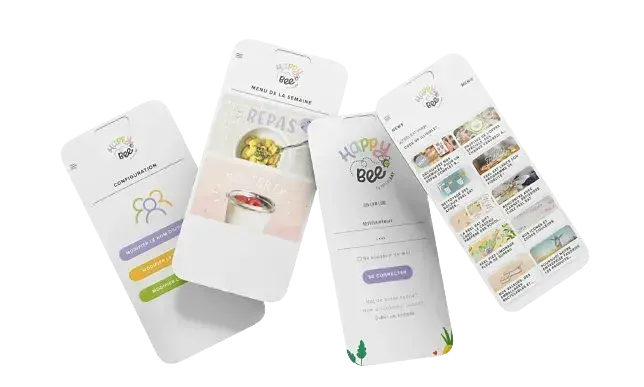
A mobile app for parents from HappyBee, FeelEat’s sister company. Parents browse the weekly menu, check nutrition details and see what each child ate during the school week.
Parents wanted to know what their child ate.
Most parents got a menu PDF in September and then heard nothing more about school lunch. HappyBee wanted them to see what each child eats, with the nutrition details, in an app they would keep opening.
We designed it for a quick look at the school gate. The app reads the same kitchen data FeelEat uses for production, so parents see what was really cooked.
The app does only a few things: the week’s menu, the nutrition and allergens of each dish, and what each child ate. Parents can check a dish themselves instead of calling the school.
Parents only saw the planned menu.
They couldn’t see what their child was given, or check whether a dish was safe for them.
Worried parents phoned the school.
Calling was the only way to get an answer about a dish.
- No meal history: parents could not look back at what their child ate during the week.
- Allergen worries: parents couldn’t check a dish against their child’s allergies themselves.
- Data stuck in the kitchen: the kitchen had full details for every dish, but none of it reached parents.
- Stale menus: parents stop opening an app once its menus are out of date.
Kitchen records now reach parents.
We connected FeelEat’s kitchen data to the parents’ app and kept each screen short enough to read in passing.
- Same-day meals: parents see what the kitchen cooked that day.
- Per-child tracking: each child’s meals across the week, allergens flagged per profile.
- Quick check: the week’s food summed up for a quick look at the gate.
- Shared backend: HappyBee reads from the existing FeelEat backend, so the data comes straight from the kitchen system.
Six features in a small app.
Built around what parents asked us in interviews.
Weekly menu browser
The school week, with dishes, photos and dietary flags for each day.
Meal history per child
What each child ate on each day of the week.
Nutrition & allergens
Detailed nutritional breakdowns and allergen flags from the production kitchen’s own data.
Multi-child households
One account for several children, even at different schools. Switching between them takes one tap.
Few notifications
Only menu changes and allergen alerts. Nothing else gets pushed.
Kitchen data integration
Live sync with FeelEat’s recipe and production systems, so menu changes show up in the app.
We talked to parents and school administrators.
They told us what they wanted to know about school lunch.
Data model
A data model that links each parent and child to their school’s meal plan.
Screens for a quick look
Each screen makes sense at a glance and needs no instructions.
iOS and Android apps
Built on the FeelEat backend, with the menu, nutrition data and each child’s meal record.
Rollout to schools
Schools joined one after another, and parents were invited in stages.
Bring your version of the HappyBee problem. Four hours, free, with the team that shipped this one.
Book the free workshopWhat kept us up at night.
Where a mistake would cost the parents’ trust.
Matching allergens to each child
A wrong allergen flag could make a parent trust a dish they shouldn’t. Allergen and nutrition data come from the production kitchen system and are matched to each child’s profile on the server.
Adoption by busy parents
We left out feeds and games and kept one job: answering “what did my child eat?” in two taps.
Settings for every school
Each school has its own menus, terms and timetables. Each one is set up through settings in the same product.
Tech stack.
The iOS and Android apps are native, and the backend is written in PHP on MySQL and Redis.





Numbers the owners watch.
What parents get from the app.
A small app with one clear job: what is on the menu this week.
Parents can check a dish themselves instead of calling the school office.
One account for several children, even at different schools.
Want numbers like these? Here is what happens after you write.
Parents had to trust HappyBee from day one: the menus, the allergens, what their child actually ate. Because CODT Technologies already knew the platform from FeelEat, we didn't start from zero. They told us plainly what to build first, and that kept our launch small and solid.

Keep exploring.
Every project here is live, paid for, and earning revenue for its owners.
Frequently asked questions
Put it in a brief. A senior engineer reads it and replies within one business day.
What is HappyBee?
HappyBee is an app that shows parents what their children eat at school: the weekly menu, nutrition details and a record of each child’s meals.
Who built HappyBee?
CODT Technologies built and operates the platform. The app reads the same kitchen data FeelEat uses for production, so parents see what was really cooked, with nutrition and allergen details for every dish.
How does HappyBee handle allergens?
Every dish has nutrition and allergen data attached, and the app checks it against each child’s profile. Parents can look it up themselves instead of calling the school.
Have a problem worth
solving well?
Tell us about your product, your timeline and your constraints. We reply within one business day with an honest read on fit, scope and the right team.