






Every Flutter vs React Native vs Kotlin Multiplatform comparison you have read opens by insisting there is no wrong answer. I think that dodges the question. Some choices are wrong for a given app, and which ones depends on what you are building and who is building it.
So here is the version with opinions in it.
Flutter vs React Native vs Kotlin Multiplatform: the short answer
Short version. With no mobile team and a launch this quarter, take Flutter. If you already pay React developers, React Native. If you have iOS and Android developers in-house, Kotlin Multiplatform: one shared core, both UIs native. And if you only need one platform, build native and skip all three.
| Flutter | React Native | Kotlin Multiplatform | |
|---|---|---|---|
| What gets shared | UI and logic, drawn by its own engine | UI and logic, shown as real native components | The logic; the UI only if you add Compose Multiplatform |
| Language | Dart | JavaScript or TypeScript | Kotlin, plus Swift for a native iOS UI |
| Best fit | No mobile team yet, a launch soon, a strong brand look | A React team you already employ | iOS and Android developers you already employ |
| Where it hurts later | Bigger app size, extra native code for deep hardware work | Upgrading native modules from many different maintainers | You still need both skill sets, and the ecosystem is smaller |
| Hiring | Big pool, fewer deep experts | The biggest pool, through React | The hardest: native developers who will work in shared Kotlin |
The three are not solving the same problem
This is the part most comparisons skip, and it explains almost every disagreement about them.
Flutter renders its own UI. It ships a rendering engine, draws every pixel itself, and does not use the platform's native widgets at all. A Flutter button is a Flutter button on both platforms, which is why a Flutter app looks identical everywhere and why it can look subtly foreign on both.
React Native does the opposite. It uses actual native components (a real UIButton on iOS, a real Android button) driven from JavaScript. You get platform-native look and behaviour for free, and you inherit the complexity of two runtimes talking to each other.
Kotlin Multiplatform, by default, shares only your business logic (networking, data models, validation, storage) and leaves the entire UI native on each platform. You write SwiftUI on iOS and Jetpack Compose on Android, and they call into one shared Kotlin core.
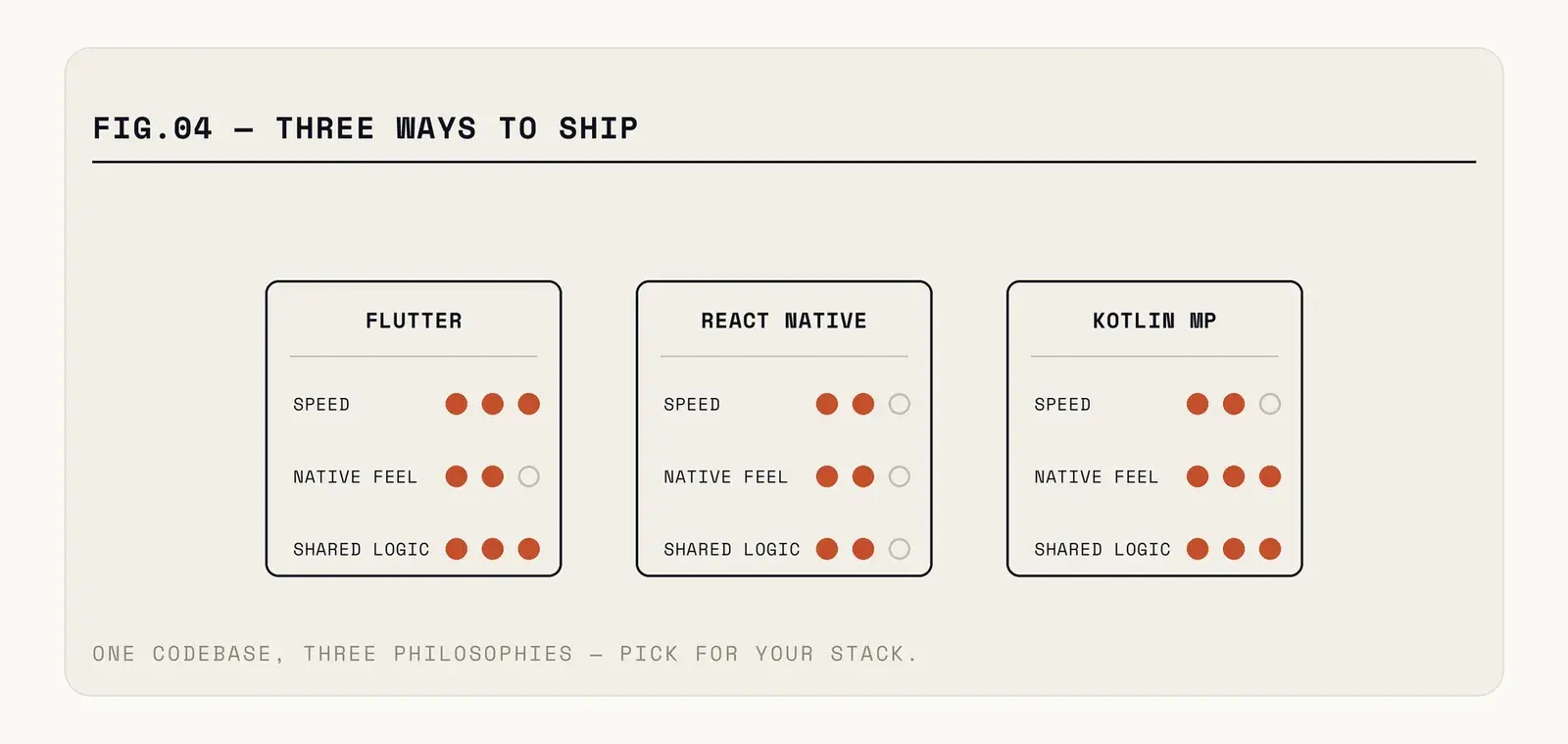
Fig. — Three different answers to the question of what "shared" should mean.
Under each framework sits a language: Dart for Flutter, JavaScript or TypeScript for React Native, Kotlin for KMP. If you're still choosing at that level, our guide to app development languages goes through them one by one.
Flutter: the one that ships fastest
If your priority is getting a polished, consistent app onto both stores quickly, Flutter is still the strongest answer, and it is not close.
The reason is that owning the rendering layer eliminates an entire category of problem. Your layout behaves identically on both platforms because it is the same code drawing the same pixels. You are not chasing a bug that only appears on one Android OEM's font scaling. Hot reload works. The widget library is comprehensive enough that most screens need no platform-specific code at all.
The costs are real though. App size starts higher because you are shipping an engine. Deep platform integration (a complex camera pipeline, a Bluetooth peripheral, anything unusual) means writing platform channels, which is native code with extra steps and a boundary to debug across. And when the OS ships a new native control, Flutter has to rebuild it, on its own schedule.
The accessibility story deserves a mention too. Because Flutter draws rather than composes native views, screen reader support depends on Flutter's semantics layer correctly describing what it painted. It is decent now. It is still a translation, and translations lose things.
Pick Flutter for consumer apps with custom design systems, content-heavy products, and anything where a distinctive brand look matters more than platform convention.
React Native: the one that fits the team you already have
The strongest argument for React Native is the team: you probably already employ React developers, and they can be productive in it in a week.
Do not underestimate that. A team of four web engineers shipping a competent mobile app without hiring is a materially different proposition from recruiting Swift and Kotlin specialists in a market where both are expensive.
The technical picture has also improved more than its reputation suggests. The new architecture removed the asynchronous bridge that caused most of the historic performance complaints, and since React Native 0.82 (October 2025) it is the only architecture an app can run on. The gap between a well-built React Native app and a native one is now invisible to users for the large majority of apps.
Where it still hurts: dependency management. A React Native project of any age accumulates native modules from different maintainers on different upgrade schedules, and a major version bump can turn into a week of untangling. That maintenance tax is the real downside, and it never stops.
Pick React Native when your team already writes JavaScript all day, or when you need to share logic with an existing web app.
Kotlin Multiplatform: the one that admits UI is the hard part
KMP is the most interesting of the three because it refuses the premise. It assumes you will build both UIs natively, and it shares only the layer underneath.
That sounds like more work, and initially it is. What you get in exchange is that the hard part under the screens (the networking, the offline sync, the data models, the business rules, the validation logic) exists once, in one language, tested once. Meanwhile each platform's UI is fully native, uses the current OS controls the day they ship, and behaves exactly the way users of that platform expect.
For a team that already has iOS and Android developers, this is often the highest-quality outcome available. Nobody has to learn a new UI framework. The apps feel right. The duplicated logic that used to drift between platforms stops drifting.
There are catches. You still need both skill sets, so it saves less headcount than the others. The tooling around iOS integration has improved a lot but remains rougher than Android's. And the ecosystem is smaller, so you write more yourself.
One thing has changed since KMP's early days. JetBrains declared Compose Multiplatform for iOS stable in May 2025 (version 1.8.0), so you can now share the UI too, written once in Compose. That is a real option. But if you share everything, you are back in Flutter's territory, and I would compare the two on your hardest screen before deciding. If native feel is why you chose KMP, keep SwiftUI on iOS.
It suits an app that will live for years, where maintenance matters more than launch day.
What about performance, actually
Performance is the argument people reach for when they want a technical reason for a preference they already hold, so it is worth being precise about where it does and does not matter.
Think of forms, lists, content, checkout and chat: for the overwhelming majority of apps, all three are fast enough that users cannot tell. In a typical app, the slow part is the network. Arguing about frame times while your API takes 900 milliseconds to return a product list is optimising the wrong thing.
Where the differences become visible: long scrolling lists with complex cells, animation-heavy interfaces running at 120Hz, anything doing real-time image or video processing, and apps that must launch instantly on low-end Android hardware. Flutter and KMP have an edge on the first three. On cold start and app size, native and KMP win, and Flutter's engine is a handicap on cheap devices in markets where storage is tight.
The test I trust from the QA side is simple. Build your single most complex screen in whichever framework you are considering, run it on the worst phone your users actually own, and see how it feels. That takes a few days and settles the argument better than any comparison table, including the one at the top of this page.
The cost nobody puts in the estimate
Hiring is where cross-platform economics either work or quietly fail.
Flutter developers are easier to find than native specialists, but the pool is shallower on deep expertise: plenty of people can build screens, fewer can debug a platform channel or profile a jank problem in the engine. React Native inherits the enormous React talent pool, which is its single biggest practical advantage, though "knows React" and "has shipped and maintained a React Native app through three OS releases" are different things and priced differently.
KMP is the hardest to hire for, because you are not hiring KMP developers. You are hiring iOS and Android developers who are willing to work in shared Kotlin, and the second half of that sentence eliminates more candidates than you would expect.
Factor in the replacement cost too. If one person leaves, how long until someone else can safely change the code? That question favours the boring choice more often than teams admit when they are choosing. (If you are deciding between hiring one freelancer and an agency for the build, this guide covers that side.)
What we picked on our own projects
Two apps from our portfolio, two different answers. The FeelEat Happy Fridge apps, which unlock the fridge and show the menu, started as native WebView shells and were rebuilt in Flutter from 2023. For FeelEat's staff app we went the other way: separate native iOS and Android apps, so each OS gets full performance and face or fingerprint login. That was the more expensive build, in exchange for less risk in daily use.
None of our published projects uses Kotlin Multiplatform yet. So the KMP section above is based on public documentation and the wider ecosystem; we have no KMP release of our own to point to.
The decision, without hedging
If you have no mobile team and need to ship this quarter, choose Flutter. Shipping speed and consistency dominate everything else at that stage, and you can rewrite later if the product survives.
If you have a React team and no mobile hires planned, choose React Native. The team fit outweighs the maintenance tax, and the performance objection no longer holds for most products.
If you have iOS and Android engineers already, choose Kotlin Multiplatform. You are not saving people anyway, so spend the shared code where it actually pays: the logic, not the buttons.
There is a fourth option that deserves saying out loud: if you are building one app for one platform because that is where your users actually are, build it natively and stop reading comparison articles. Cross-platform is a solution to the problem of supporting two platforms. If you do not have that problem, you are paying a tax for nothing: an extra abstraction layer, an extra upgrade treadmill, and a slower path to any new OS feature. Picking Flutter for an app that will only ever ship on Android is exactly that tax.
And if your app is simple, a well-built mobile web app might close the gap entirely. It is an unfashionable answer. Still, plenty of apps in the stores would have been better as a website with a decent install prompt.
One caveat on all of the above: this is a decision you can revisit, even though it is easy to treat it as permanent. Rewriting a two-year-old app in a different framework is expensive but survivable, and it is a smaller project than most people assume because the hard-won parts (the API contracts, the business rules, the understanding of what users actually do) carry over unchanged. What does not carry over is the UI layer, which is usually the part that needed rewriting anyway. So give the decision a few weeks at most.
A capable team ships a good app in the wrong framework. A struggling team ships a bad one in the right framework, on schedule, and nobody can work out why it feels cheap.
If you want a second opinion on the stack for your app, our mobile app team will go through it with you. Send us the details. For a first idea of what the build itself costs, try the app cost calculator.
FAQ
Which cross-platform framework has the best long-term future?
All three have big backers and regular releases: Google behind Flutter, Meta behind React Native, JetBrains behind Kotlin Multiplatform. None of them looks likely to disappear soon. The safer long-term bet is the one your team can still maintain three years from now.
Flutter vs Kotlin Multiplatform: which should I choose for a new mobile app?
Flutter, if you have no mobile developers yet and want one codebase, UI included, in both stores fast. Kotlin Multiplatform, if you already employ iOS and Android developers and want native screens on top of one shared core. Compose Multiplatform lets KMP share the UI too; in that case, build your hardest screen in both and compare.
KMP vs React Native: which one should we pick?
They answer different questions. React Native lets a JavaScript team write one app that shows real native components. Kotlin Multiplatform lets native developers share the logic and keep each platform's own UI. So pick by the team you have: React developers point to React Native, Swift and Kotlin developers point to KMP.
Which one makes the lightest app?
Usually Kotlin Multiplatform with native UIs, because each app only adds the shared Kotlin core to what a native app ships anyway. Flutter and React Native both carry a runtime of their own, so their apps start bigger. On cheap Android phones with little free storage, that difference can be one users notice.