




The FeelEat employee app: hours, leave and the CCNT time sheet.
Built by CODT Technologies for FeelEat's staff, who log in with Face ID or fingerprint, an NFC badge, or email and password.


- Badge in at the kiosk, log in, see every shift with its times.
- Dates, type, certificate, submit. Pending until a manager approves.
- The monthly time sheet, signed by finger. A copy goes by email.
- A 6-digit code, a photo of the licence, then approved.
- Hours straight from the TapTime kiosk
- Hours
- Leave requests approved in the admin portal
- Leave
- Monthly CCNT form signed in the app
- CCNT
- app languages
- FR · DE · EN
What is the FeelEat employee app?
The FeelEat employee app is a self-service app for FeelEat's staff in Switzerland, on iOS and Android, built by CODT Technologies. Staff log in with face or fingerprint, their NFC badge, or a password. They see hours recorded at the TapTime kiosk, request leave, sign the monthly CCNT form and upload ID documents.
The app at a glance
- Client
- FeelEat (Switzerland)
- Used by
- FeelEat staff, across its sites
- Platform
- iOS · Android
- Languages
- French, German, English
- Login
- Face ID or fingerprint · NFC badge · Email + password
Native iOS and Android apps on a Node.js and NestJS backend, with MySQL and Redis.
One employee's month in the app, screen by screen
The app's real design screens, a chapter at a time, in the order a month goes.
Hours arrive from the kiosk
Staff clock in and out at the TapTime kiosk with their badge. The app can't clock anyone in. It shows what the kiosk recorded, live, down to each shift.
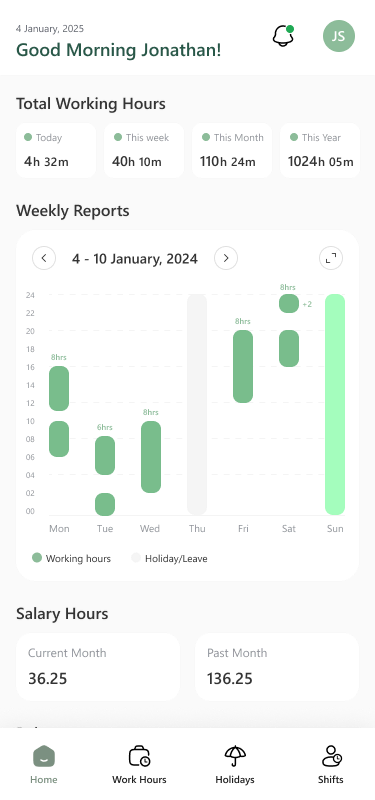
Home: hours at a glance
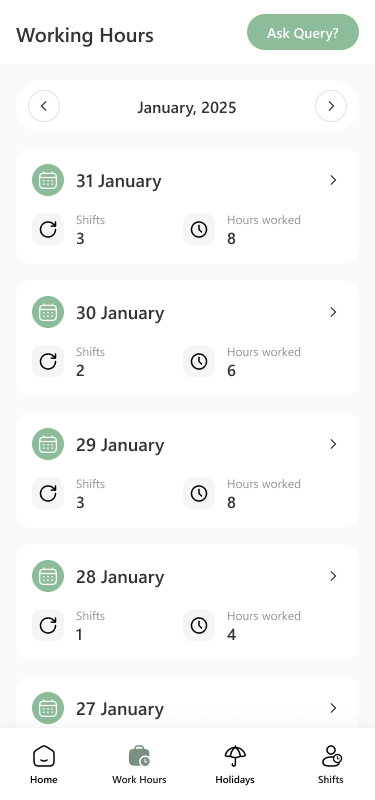
Working hours, day by day
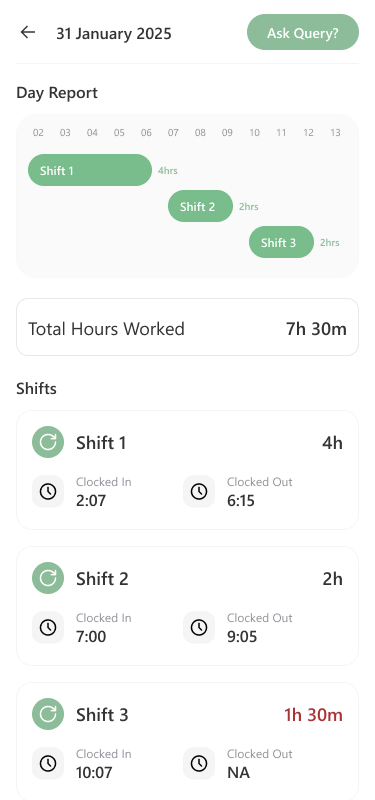
Each shift, in and out
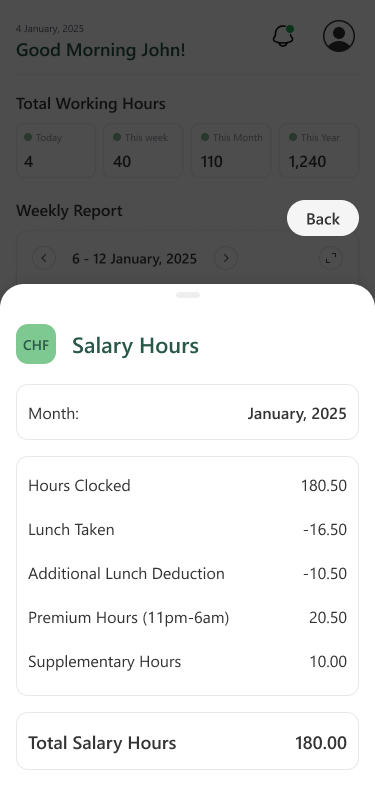
Salary hours for the month
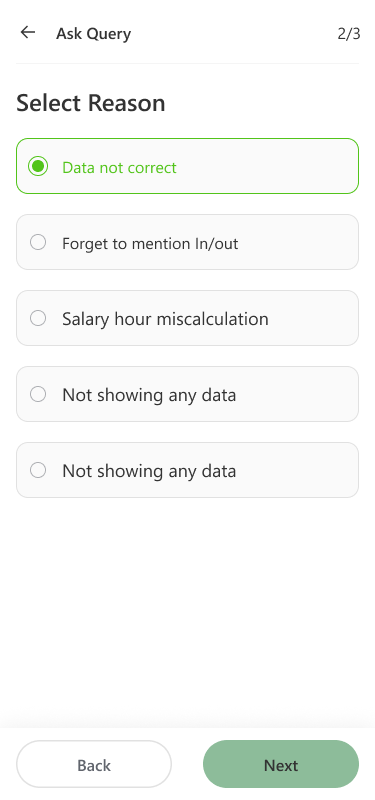
A day looks wrong? Ask


Leave, asked for in four steps
Dates, type, certificate, send. While a request is pending, staff can send the admin a reminder or cancel it.
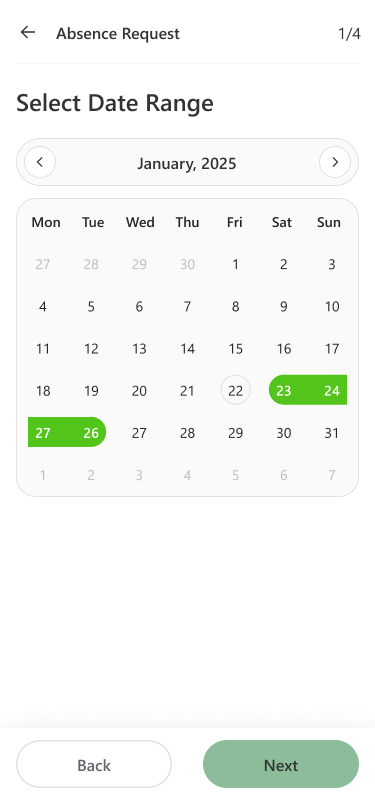
The dates
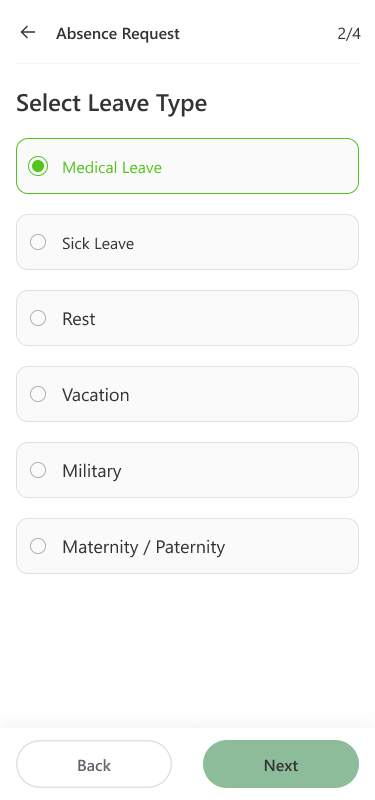
The leave type
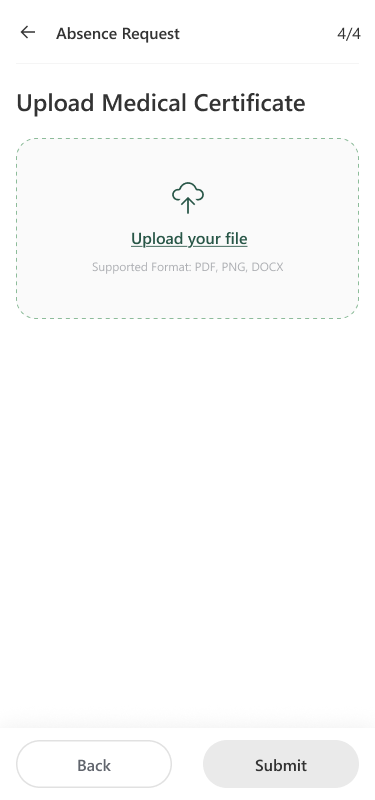
The medical certificate
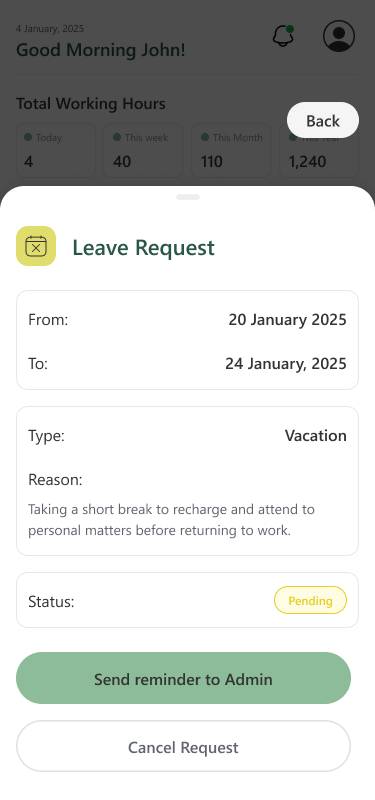
Pending: remind or cancel
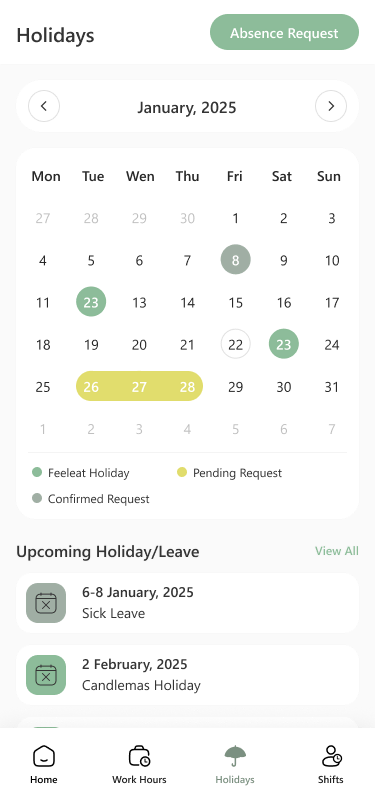
The holiday calendar


The CCNT time sheet, signed on the phone
Each month the CCNT working-time record («Saisie du temps de travail CCNT art. 15 et art. 21») waits in the app. Staff read it, sign with a finger and approve.
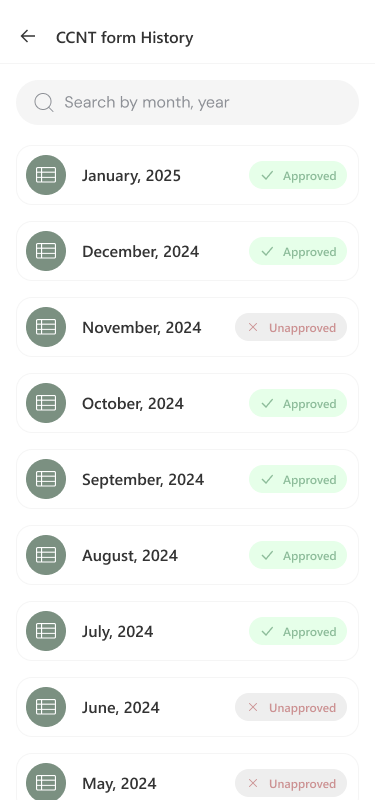
Every month, approved or not
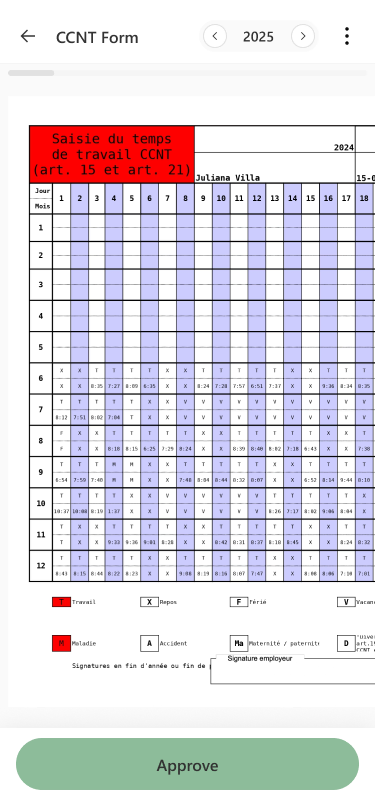
The month's CCNT form
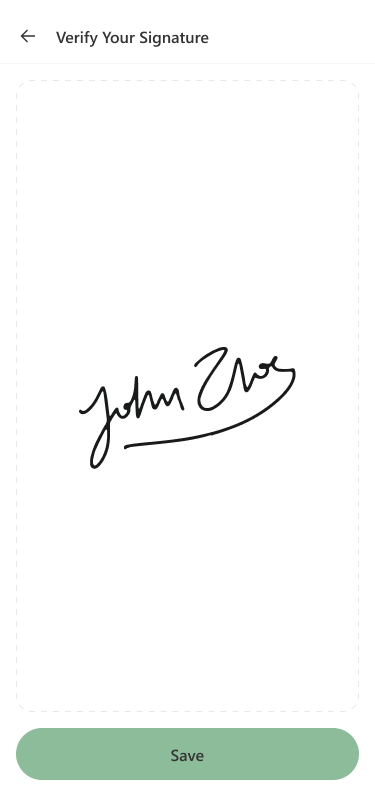
Sign with a finger
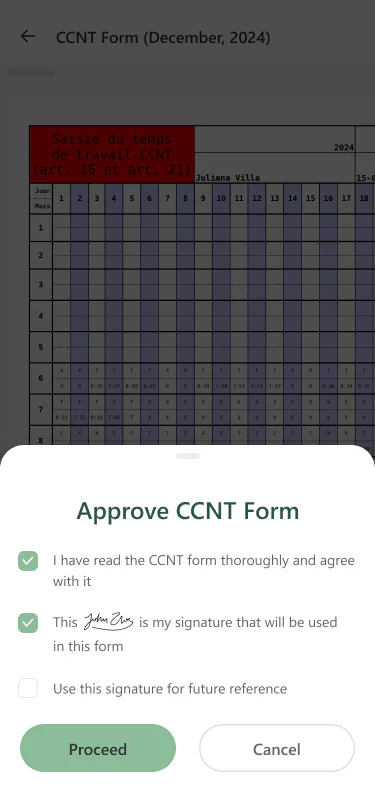
Read, agree, approve
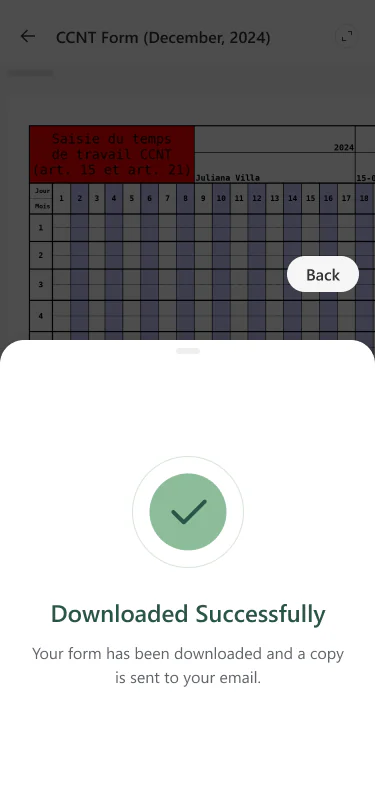
Copy sent by email


Documents, checked in one place
ID card, passport, visa, proof of address, driving licence. If one is missing, the app asks for it within 7 days.
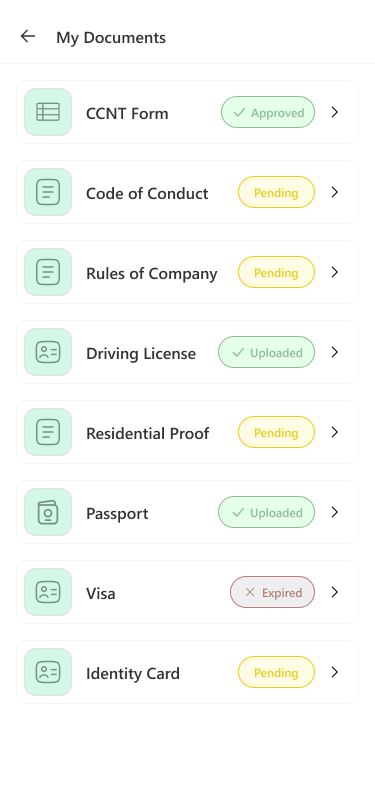
My Documents, with statuses
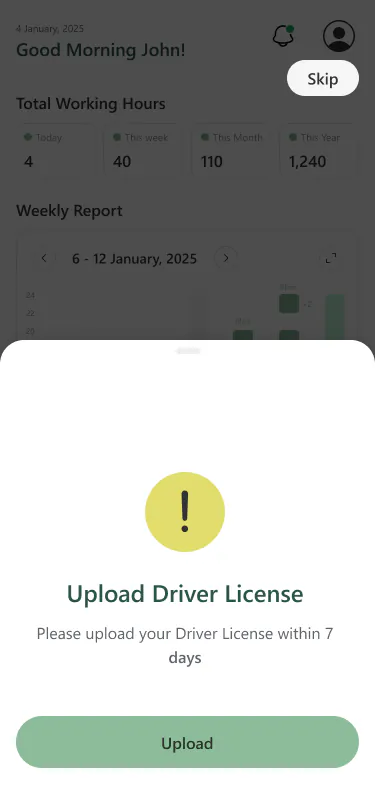
Upload it within 7 days
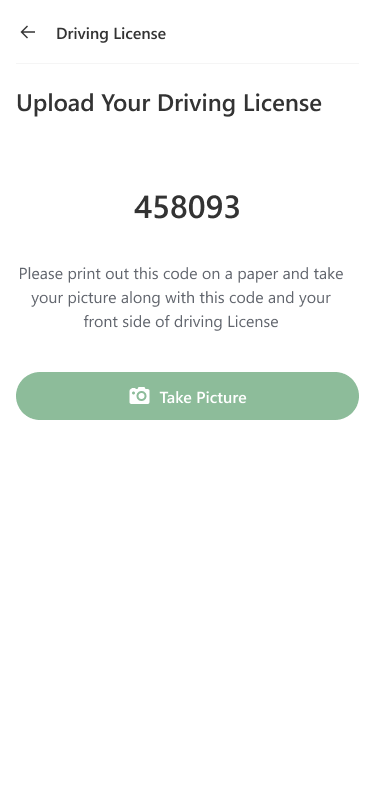
The 6-digit licence code
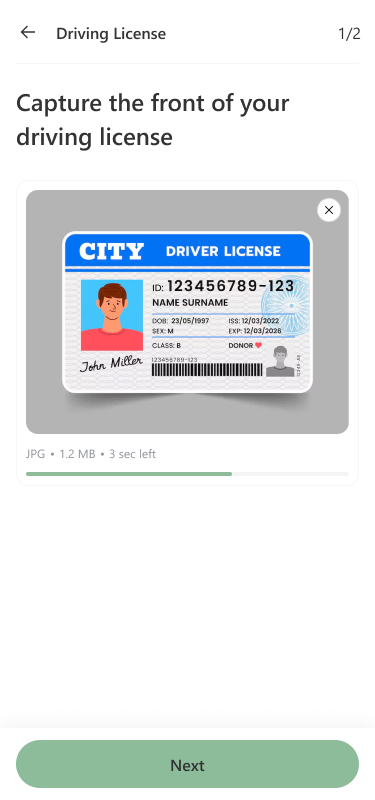
Photo of the licence front
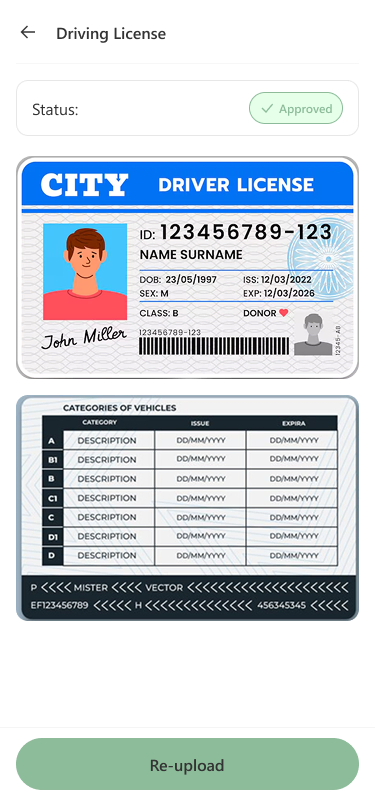
Checked and approved


These are the app's design screens. The names and numbers in them are sample data.
Three ways to log in: password, face or fingerprint, NFC badge
The app's login screen gives all three the same place. Staff pick the one that suits their phone.
Email and password
Works on any phone.
Face or fingerprint
Face ID or fingerprint: the phone's own unlock.
NFC badge
The same badge as the TapTime kiosk, read by the phone's built-in NFC.
What employees do in the hospitality staff app
Nine jobs the app handles. The small screens on the cards are redrawn from the app, with sample data.
Hours, live from the kiosk
Nobody clocks in from the app. Staff clock in at the kiosk, and the app shows what it recorded: today, this week, this month, this year.
Every shift, with its times
Open a day to see each shift with its clock-in and clock-out. A missing clock-out shows as NA.
Paid hours, line by line
Hours clocked, lunch taken, the extra lunch deduction, premium hours between 11pm and 6am, supplementary hours. Then the total that counts for salary.
Ask about a day
If a day looks wrong, staff raise a query on that day and pick the reason. No phone call, no email chain.
Leave in four steps
Dates, leave type, a medical certificate if needed, send. Medical, sick, rest, vacation, military, maternity or paternity leave all go the same way.
Holidays on one calendar
FeelEat holidays, pending and confirmed requests sit on one calendar, next to a list of the Swiss public holidays coming up.
The CCNT form, signed by finger
At month end staff open their CCNT working-time form, read it, sign on the screen and approve. A copy goes to their email.
Documents, each with a status
ID card, passport, visa, proof of address and driving licence, uploaded from the camera or a file. The Code of Conduct and the company rules are read and approved here too.
A driving licence check with a code
The app shows a 6-digit code. The employee writes it on paper and takes a photo holding it next to the front of the licence.
Why there is no clock-in button
Hours are recorded in one place only: the TapTime kiosk, with the NFC badge. The app shows those hours live, shift by shift, but it cannot clock anyone in. If a day looks wrong, staff raise a query on that day instead of adding a second entry.
- TapTime kioskbadge clock-in
- Staff apphours, leave, CCNT
- Admin portalapprovals
- ERPpayroll
Staff
See their hours, shifts and paid hours, ask for leave, sign the CCNT form and keep their documents up to date.
Managers
Approve leave, documents and CCNT forms in the FeelEat admin portal, with a remark the employee reads in the app.
The FeelEat admin portal caseBefore
Paper CCNT sheetsExcelEmail
Now one app, with documents checked and staff verified in one place.
Want numbers like these? Here is what happens after you write.
I run operations, so I judge software by how it behaves at seven in the morning when a fridge or a shift goes wrong. With CODT Technologies I have one team that knows the whole setup, answers quickly and fixes the root cause.
 Joel HermannOperations Head · FeelEat
What more we can build on this staff app
None of this is in the app today. These are ideas we would talk through with any team that runs shifts like FeelEat's.
- + Possible addition
Shift swaps
A staff member offers a shift, a colleague takes it, and the manager approves the swap in the portal.
Mobile app development - + Possible addition
Payslips next to the hours
The month's payslip from the ERP, in the same place as the salary hours it was built from.
ERP and automation - + Possible addition
An onboarding checklist
A new hire's first week as one list: documents, consents, badge login, the first CCNT form.
UI/UX design - + Possible addition
An assistant for hours questions
Staff ask in French, German or English why a day looks short. The assistant reads their own records, and a person answers what it can't.
AI agents
Planning a staff app like this? What to decide first
Three questions shape the build: where hours are recorded, which logins your staff's phones support, and which forms people sign each month. Answer them first, then compare costs and the choice between building and buying.
Want an app like this for your own staff?
Keep exploring.
Every project here is live, paid for, and earning revenue for its owners.
Frequently asked questions
Put it in a brief. A senior engineer reads it and replies within one business day.
Can employees clock in from the FeelEat app?
No. Staff clock in and out at the TapTime kiosk with their NFC badge, and the kiosk records the hours. The app shows those hours live: per day, week, month and year, every shift with its clock-in and clock-out times, and the paid hours. If a day looks wrong, staff raise a query on that day.
How do staff log in with their NFC badge on their own phone?
They tap “Login with Badge” and hold the same NFC badge they use at the TapTime kiosk to the phone. The kiosk reads the badge with an external NFC reader; the app reads it with the phone's built-in NFC, on phones that have it. Staff can also log in with Face ID or fingerprint, or with email and password.
How is the monthly CCNT time sheet signed in the app?
Each month staff open their CCNT working-time form, the «Saisie du temps de travail CCNT», read it, sign with a finger on the screen and approve. A copy is sent to their email. The form history shows which months are approved and which are still unapproved.
Who approves leave, documents and time sheets?
Managers and the office approve them in the FeelEat admin portal, a separate system CODT Technologies also built. The employee sees the result in the app as a status, and a cancelled leave request can carry a manager remark. While a request is pending, staff can send a reminder to the admin or cancel it.
Which documents can staff upload?
Identity card, passport, visa, proof of address and driving licence, from the phone's camera or as a file. Each shows Approved, Pending, Uploaded or Expired, and the app asks for a missing one within 7 days. For the driving licence the app shows a 6-digit code, which the employee photographs on paper beside the licence front.
How do the hours get into payroll and the ERP?
Hours are recorded at the TapTime kiosk, shown to the employee in the app and passed on to FeelEat's ERP system, which runs payroll. Staff see the same hours with the paid-hours breakdown and can query a day before it becomes a problem.
Which languages and phones does it support?
The app runs on iOS and Android, in French, German and English. On iPhone staff can log in with Face ID, on Android with face or fingerprint. FeelEat works in Switzerland with staff at several sites, so each person uses the language they read best. Badge login needs a phone with NFC; email and password work on any phone.
What does it cost to build a custom employee app?
It depends on what the app has to do: the logins, the forms people sign, the approvals and the systems it connects to, such as a kiosk, an admin portal or an ERP. Our guide to app development costs in Switzerland explains what makes a project bigger or smaller. Your own figure comes as a fixed quote after a free 4-hour workshop.
Should we buy an off-the-shelf staff app or build our own?
An off-the-shelf app fits when your rules match the product's. FeelEat needed its own kiosk badge, the monthly CCNT form signed in the app, its own leave types and document checks tied to its admin portal and ERP, so a custom app made sense. Our article on custom versus standard software walks through the trade-offs.
Can CODT Technologies build a similar app for our hotel or restaurant group? Is this app for sale?
The FeelEat app is FeelEat's own custom software, so it is not for sale. CODT Technologies builds similar staff apps for other companies, shaped around their own hours, forms and approvals, on iOS and Android, with the engineering team in Gurugram, India.
Have a problem worth
solving well?
Tell us about your product, your timeline and your constraints. We reply within one business day with an honest read on fit, scope and the right team.